๐Ÿ“ฑ iPhone & iPad ๐Ÿ”’ Face ID Login ๐ŸŽ™๏ธ Siri Shortcuts

Your pool,
at your fingertips

Control your Pentair IntelliCenter pool from anywhere. Turn on the spa, set temperatures, change light colors, and load scenes โ€” all from a beautiful iPhone app.

30-day free trial ยท No credit card required ยท Cancel anytime

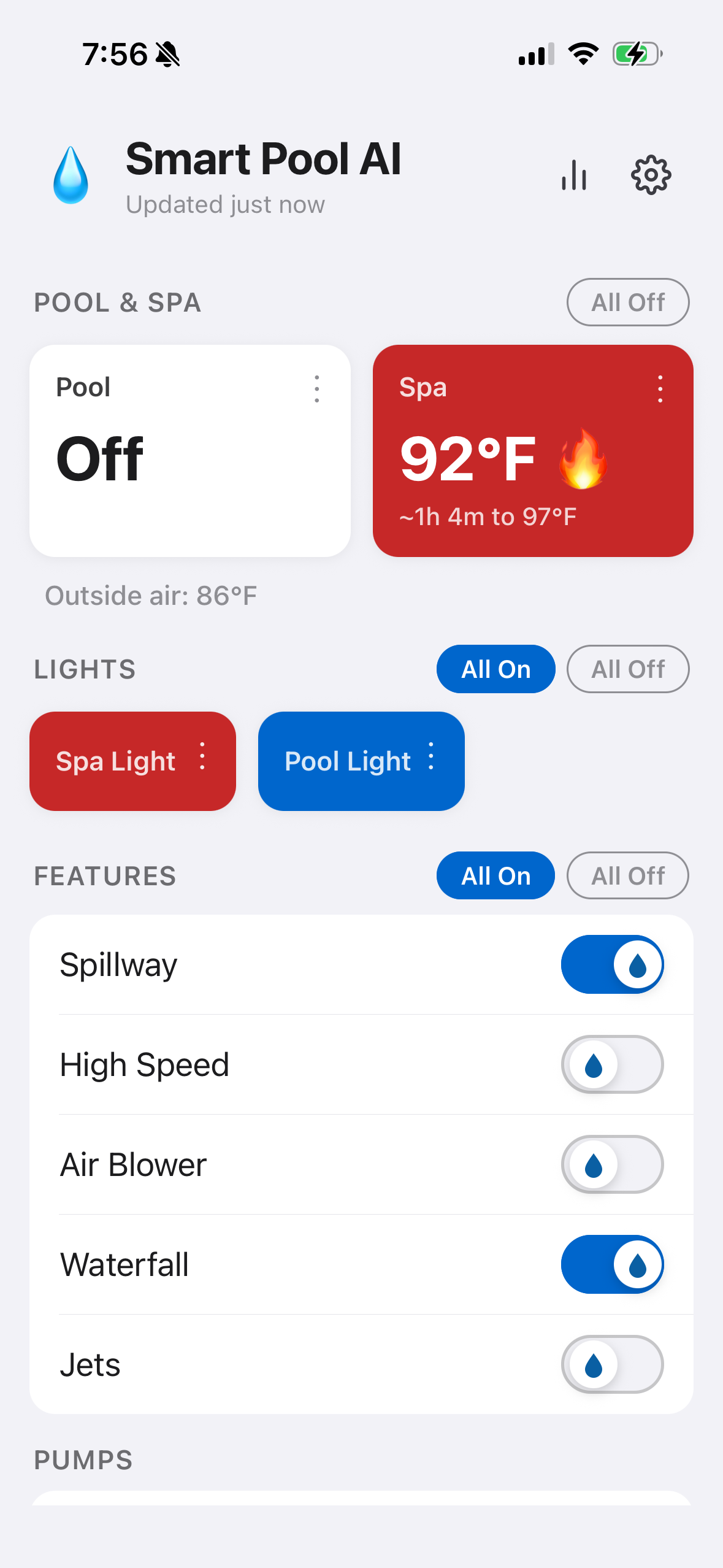
Smart Pool iPhone app showing Spa heating to 97ยฐF with Smart Heat ETA, lights and feature controls
โฑ๏ธ
Smart Heat
ETA to target temp
๐Ÿ’ก
Light Control
Colors per zone
๐ŸŽ™๏ธ
Voice + Siri
"Turn on spillway"
Features

Everything you need,
nothing you don't

A clean, intuitive interface designed for iPhone. One glance tells you everything happening at your pool.

๐ŸŠโ€โ™‚๏ธ

Pool & Spa Control

Turn your pool and spa on or off instantly. Real-time temperature display with current water temp and your target setpoint โ€” always know exactly what's happening.

All Plans
๐Ÿ’ก

Light Color Control

Choose from 12 Pentair light colors and show modes โ€” White, Sunset, Party, Romance, Caribbean, American, and more. The card color reflects your current selection.

All Plans
๐Ÿ’ง

Features & Circuits

Control Jets, Waterfall, Air Blower, Spillway, and High Speed Pump from one screen. All with simple, instant toggles.

All Plans
๐Ÿ”ฅ

Heater Management

Enable or disable the heater for pool or spa, then set your exact target temperature with a precision arc dial. See whether heating is actively running.

Standard+
๐ŸŽฌ

Scenes

Save your perfect pool setup as a scene and recall it instantly. "Night Swim," "Party Mode," "Kid Time" โ€” one tap restores everything. Includes built-in Vacation and All Off scenes.

Included
๐Ÿ—“๏ธ

Scheduling

Schedule any scene to activate automatically on specific days and times. Your pool can be warm and ready before you even step outside.

Included
๐Ÿ”ฅ

Smart Heat

Tell the app when you want the spa ready โ€” it learns your heater's warm-up time and starts automatically so it's at temperature when you arrive. Estimates improve with every use.

Included
๐Ÿ”’

Face ID Login

Sign in instantly with Face ID or Touch ID. Your credentials are secured in iOS Keychain โ€” no passwords to remember, no extra taps.

All Plans
๐Ÿงฉ

Home Screen Widgets

See pool and spa status at a glance right from your home screen. Small, medium, and large widgets โ€” no need to open the app.

All Plans
๐Ÿ“‹

Activity Log

Every action you take is logged with a timestamp โ€” pool on, temperature set, scene loaded, light color changed. Review your full history anytime in Settings.

All Plans
What You Control

Full control over your
IntelliCenter system

Smart Pool talks directly to your Pentair IntelliCenter using your existing account โ€” no extra hardware, no hub required.

๐ŸŠ

Pool & Spa

Turn on/off, view live water temperature, set target temp, toggle heater

Included
๐Ÿ’ก

Lights

Pool & Spa lights โ€” on/off and full 12-color Pentair color/show-mode picker

Included
๐Ÿ’ง

Features

Jets, Waterfall, Air Blower, Spillway, High Speed Pump โ€” all individually switchable

Included
๐ŸŒก๏ธ

Temperature

Set precise pool and spa target temperatures 60โ€“104ยฐF with an arc dial in the settings sheet

Included
๐ŸŽฌ

Custom Scenes

Save your pool's entire state โ€” every circuit, every temperature โ€” as a named scene

Included
๐Ÿ—“๏ธ

Scheduled Scenes

Auto-run any scene on selected days at a specific time โ€” pool ready when you need it

Included
๐Ÿ”ฅ

Smart Heat

Set a "ready by" time โ€” the app learns warm-up duration and starts heating automatically

Included
๐Ÿ–๏ธ

Built-in Scenes

"Vacation" and "All Off" scenes included โ€” ready to use right away

Included
๐Ÿ“Š

Live Status

Pull-to-refresh for real-time status. Outside air temperature shown when your ZIP is on file

Included
Siri & iOS Shortcuts

Just say the word

Smart Pool integrates with Siri and the iOS Shortcuts app. Control your entire pool system with your voice or automate it with powerful multi-step shortcuts.

Siri ยท Smart Pool
You
"Hey Siri, turn on the spa"
Siri
Spa turned on. ๐ŸŒŠ
You
"Set pool temperature to 85"
Siri
Pool temperature set to 85ยฐF. ๐ŸŒก๏ธ
You
"Set pool lights to party"
Siri
Pool lights set to Party mode. ๐ŸŽ‰
๐ŸŽ™๏ธ

30+ Siri Commands

Turn on/off pool, spa, lights, and features. Set temperatures. Set heat source to gas or solar. Load, save, list, and delete scenes โ€” all hands-free.

โšก

iOS Shortcuts Automation

Build multi-step automations in the Shortcuts app. "When I arrive home, turn on pool and set lights to blue."

๐Ÿก

Works Without Opening the App

App Intents connect directly to your pool. Siri and Shortcuts work even when Smart Pool isn't open.

๐Ÿ“ฑ

Home Screen Widgets

See live pool status and tap to toggle pool or spa right from your home screen. No app launch required.

Pricing

One price. Everything included.

No tiers, no locked features. Full control of your pool and spa โ€” for $9.99 a month.

Subscription managed via Apple In-App Purchase. Cancel anytime in Settings โ†’ Apple ID โ†’ Subscriptions.

Get Started

Up and running in minutes

No hardware. No hub. Just your Pentair IntelliCenter account and your iPhone.

1

Download the App

Search "Smart Pool AI" on the App Store or tap the download button below.

2

Sign In

Use your existing Pentair IntelliCenter (ScreenLogic) email and password. No new account needed.

3

Enable Face ID

When prompted, enable Face ID for instant one-tap access. Your credentials stay safely in iOS Keychain.

4

Take Control

Your pool is on the screen. Tap to toggle, swipe to adjust temperature, and ask Siri to do the rest.

Download on the App Store

30-day free trial ยท No credit card required

Reviews

Pool owners love it

โ˜…โ˜…โ˜…โ˜…โ˜…

"Finally an app that actually works with IntelliCenter. I can warm up the spa while still inside watching TV. Face ID makes it instant."

โ€” Jason M., Pool Owner ยท Phoenix, AZ
โ˜…โ˜…โ˜…โ˜…โ˜…

"The Siri integration is a game changer. I just say 'Hey Siri, turn on the pool lights and set them to party' and it's done. Kids love it."

โ€” Sarah K., Pool Owner ยท Austin, TX
โ˜…โ˜…โ˜…โ˜…โ˜…

"Scenes alone are worth it. I have 'Friday Night' saved โ€” pool on, lights to romance, spa to 102ยฐF. One tap, done."

โ€” David R., Pool Owner ยท San Diego, CA

Ready to take control?

Join thousands of Pentair pool owners who manage their pool from their iPhone.

Download on the App Store

30-day free trial ยท No credit card required ยท Cancel anytime

Learning Center

Master your smart pool

Six short guides โ€” from first-day basics to hidden features most users never find.

๐ŸŒŠ
Week 1
Pool, Spa & Lights
Control everything from your iPhone, from anywhere.
๐ŸŒก๏ธ
Week 2
The Smart Heater
Your pool learns exactly how long it takes to heat up.
๐ŸŽฌ
Week 3
Scenes
One tap sets lights, temp, jets, waterfall โ€” all at once.
๐Ÿ’ง
Week 4
Pump Mastery
Use the right speed for each job and save on energy bills.
๐Ÿ‘จโ€๐Ÿ‘ฉโ€๐Ÿ‘ง
Week 5
Family Plan
Give everyone in your household full pool access.
โญ
Week 6
Pro Tips
6 tips most users never discover. Level up your pool.
View all guides โ†’
FAQ

Common questions

Everything you need to know before getting started.

Smart Pool works with the Pentair IntelliCenter pool control system. You'll need an active ScreenLogic Connect account โ€” the same one you use with the official Pentair Home app. IntelliTouch and EasyTouch systems are not currently supported.
No โ€” Smart Pool works from anywhere with an internet connection. Control your pool from across the country, check temperatures before you leave work, or turn the spa on during your commute home.
Your free trial gives you full access to every feature โ€” live pool status, temperature control, light colors, scenes, schedules, and all circuit controls. No credit card required to start, and you can cancel before the trial ends without being charged.
Yes โ€” Smart Pool for iPhone and the Smart Pool Alexa skill share the same account. Scenes and schedules you create in the app are available by voice, and vice versa. You can subscribe to either one independently or use both together.
Yes. Smart Pool connects to your IntelliCenter system using the same encrypted API as the official Pentair Home app. Your credentials are never stored in plain text and all communication happens over HTTPS. We don't sell your data.
Smart Pool connects through Pentair's cloud service, so your pool controller must have an active ScreenLogic network connection. If your IntelliCenter is offline or your home internet is down, commands will fail gracefully with a clear error message โ€” nothing unsafe will happen to your pool.
Go to iPhone Settings โ†’ [Your Name] โ†’ Subscriptions, find Smart Pool, and tap Cancel. You keep full access until the end of your current billing period. You can also manage it directly from the Smart Pool app under Settings.

Compatibility: Smart Pool requires a Pentair IntelliCenter pool control system with an active ScreenLogic Connect account. Compatible with iPhone running iOS 16 or later.

Disclaimer: Smart Pool AI is an independent app and is not affiliated with, endorsed by, or connected to Pentair, Inc. "IntelliCenter" and "ScreenLogic" are trademarks of Pentair, Inc. Their use here is solely to describe compatibility. Use this app at your own risk.

ยฉ 2026 Smart Pool AI. All rights reserved. Privacy Policy ยท Terms of Service